

For most agents, the fastest and most defensible way to build a repair request list is Hunt Home Inspection’s Create Request List™ (CRL™). It pulls items directly from a published inspection report, logs every edit with a timestamp and user ID, and produces an attachable file ready for your state addendum form. Three reasons it stands out:
- Speeds negotiation. Items link back to the original report findings and photos, so there’s no back-and-forth about what the inspector actually said. Timestamps show when requests were submitted, which matters when deadlines are tight.
- Supports real collaboration. Both the agent and the buyer can work on the same list simultaneously. Branded, secure delivery keeps the document professional and access-controlled from the moment it leaves your hands.
- Reduces liability. Every addition and change is logged with a user ID and edit history, creating an audit trail that protects you if a dispute surfaces later.
A live demo is available, and because Hunt Home Inspection delivers reports within 24 hours, you can open the CRL and start building your request list the same day as the inspection.
Table of Contents
- How do you access, edit, and export a Create Request List?
- What features should you compare across inspection request tools?
- What do pricing models and turnaround times mean for your workflow?
- Ready-to-use templates and a sample repair request workflow
- How should you present repair requests to sellers without killing the deal?
- How does Hunt Home Inspection’s Create Request List™ work in practice?
- Key Takeaways
- Why the Create Request List™ approach matters more than agents think
- Get started with Hunt Home Inspection’s Create Request List™
- Useful sources and further reading
How do you access, edit, and export a Create Request List?
The process is shorter than most agents expect. Here’s the exact sequence from report delivery to a signed addendum attachment.
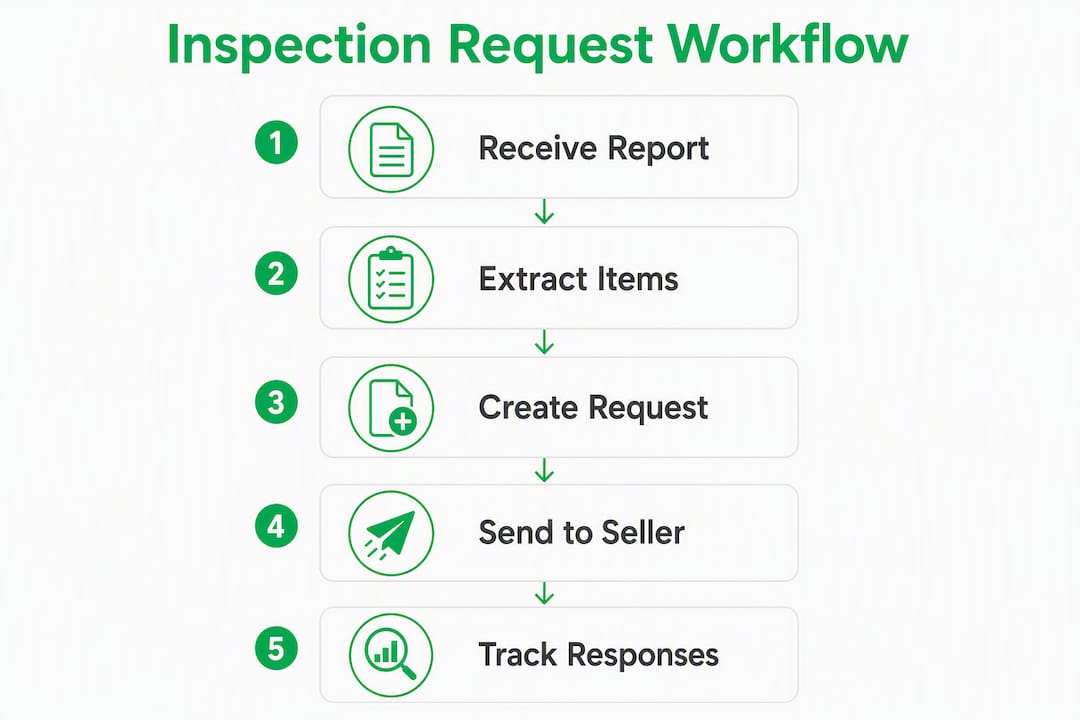
- Open the published report. Once Hunt Home Inspection delivers your report (within 24 hours), you’ll receive a link to the Buyer/Agent dashboard. Click it and log in. No separate software download is needed.
- Launch the CRL builder. From the dashboard, select “Create Request List.” The tool loads the full report findings, organized by category, with photos attached to each item.
- Select report items. Check the box next to any finding you want to include. The item description, report section reference, and any associated photo carry over automatically. This is what eliminates copy-paste errors.
- Add custom items. Need to include something the inspector flagged verbally but didn’t categorize as a defect? Use the custom item field. These additions are logged separately so the inspector’s original findings stay intact.
- Assign priority or type. Label each item as a repair request, credit request, or “request for further inspection/quote.” This distinction matters when you’re presenting options to a seller.
- Invite buyer collaboration. Share the draft list with your buyer. Both of you can add comments, adjust wording, and flag priorities. The tool records who changed what and when.
- Save versions. Before finalizing, save a version. If the seller counters and you need to revise, you’ll have a clean record of what was originally submitted.
- Export and attach. Download the list as a PDF or export it in a format compatible with your state addendum form. The file includes item descriptions, report references, and photos where applicable.
- Deliver securely. Send via the branded secure link rather than a plain email attachment. This preserves access control and creates a delivery record.
Pro Tip: When your state addendum has limited space, write “See attached Create Request List™” in the addendum body and attach the exported PDF. This keeps the legal form clean while preserving the full detail of every request.
For scheduling and logistics around the inspection itself, the inspection scheduling guide covers timing best practices that affect when you can realistically start building your list.
What features should you compare across inspection request tools?
The features that actually change negotiation outcomes are not the ones that look impressive in a demo. They’re the ones that hold up when a seller’s agent pushes back at 9 PM on a Friday.
Core features to evaluate:
- Integration with the inspection report. Can you pull items and photos directly from the report, or are you re-typing findings? Direct integration eliminates transcription errors and keeps requests tethered to documented evidence.
- Mobile-first editing. Agents and buyers rarely sit at a desktop during a transaction. Mobile-optimized delivery and editing, including offline capability, are now standard expectations for any serious tool.
- Branded client delivery and secure portal. A magic link or branded portal looks professional and limits who can access the document. Plain email attachments have no access control.
- Collaboration and version history. Can the buyer and agent edit simultaneously? Does the tool log who changed what? Version history is your protection if a dispute arises about what was requested and when.
- Export and print formats. PDF is the minimum. CSV export matters for agents who track requests in a spreadsheet or transaction management platform. Check that the exported file is formatted for your state’s addendum.
- AI-assisted drafting and templating. Newer platforms include AI features such as image defect detection and auto-drafted request text. Useful for first drafts, but always review before sending.
- Pricing model and trial availability. Per-report fees, flat-rate subscriptions, and agent-seat portals each have different cost profiles depending on your transaction volume. A demo or trial period lets you test the workflow before committing.
- Turnaround time and support. If the inspector takes 48 hours to deliver a report, your negotiation window shrinks. Support quality matters when something breaks mid-transaction.
Conceptual feature comparison by tool category:
| Feature | Entry-level field apps | Team portals | Inspector-integrated CRL tools |
|---|---|---|---|
| Report item integration | Manual import or PDF upload | Partial, depends on inspector | Native, direct pull from report |
| Mobile editing | Yes, varies by app | Yes | Yes, mobile-optimized |
| Branded client delivery | Rarely included | Often included | Included |
| Collaboration and version history | Limited or none | Usually included | Full edit log with user IDs |
| PDF/CSV export | PDF only, typically | PDF and CSV | PDF, attachable addendum format |
| AI-assisted drafting | Rarely | Emerging | Available on updated platforms |
| Pricing model | Per-report or per-user | Flat-rate subscription | Bundled with inspection service |
| Demo or trial availability | Varies | Usually yes | Yes, live demo available |

Pro Tip: When evaluating any tool, ask specifically about versioning and timestamps before you ask about PDF styling. A polished export means nothing if you can’t prove what was requested and when. The audit trail is your liability protection.
For a broader look at digital inspection tools available to buyers and agents, the online home inspection tools list covers the current field in more detail.
What do pricing models and turnaround times mean for your workflow?
Pricing for inspection request tools falls into three common shapes, and each one has a predictable trade-off depending on how many transactions you close per year.
- Per-report fee. You pay each time a report is generated or a CRL is created. Low upfront cost, but it adds up quickly for high-volume agents. Good for occasional users or agents testing a new inspector relationship.
- Flat-rate subscription. One price covers unlimited reports, portals, and agent features. Flat-rate models are an emerging response to per-report friction and make full-featured agent portals accessible for solo agents and small teams. The trade-off is a fixed monthly or annual commitment regardless of volume.
- Agent-seat portal. The inspection company provides an agent-facing portal as part of their service. No separate software cost for the agent. Features like repair request builders, PDF generation, and photo management are bundled in. This is the model Hunt Home Inspection uses with Create Request List™.
Turnaround time matters more than most agents realize. If your inspection happens Monday morning and the report arrives Wednesday, you’ve lost two days of your negotiation window. Hunt Home Inspection delivers reports within 24 hours, which means you can open the CRL builder the same day as the inspection and have a draft request list ready before the seller’s agent even knows the inspection is done.
When evaluating a tool or inspector, ask these questions during the demo:
- What is the standard report delivery window, and is 24-hour delivery guaranteed?
- Is the CRL included in the inspection fee, or is it a separate charge?
- Can I export in a format compatible with my state’s addendum form?
- Does the tool integrate with my transaction management platform or CRM?
- What happens to my data if I stop using the service?
Transparent pricing with no per-report add-ons is worth paying a slight premium for if you’re closing more than a handful of transactions per month.

Ready-to-use templates and a sample repair request workflow
Use these templates verbatim or adapt them to your brokerage forms. The goal is to reduce drafting time and keep language neutral, factual, and tied to the inspection report.
Template A: Standard repair request
Item: [Inspector’s finding, e.g., “Defective GFCI outlet in master bathroom”]
Report reference: Section 4.2, Photo 14
Request: Seller to repair or replace GFCI outlet to code-compliant condition prior to closing. Buyer requests written confirmation of completed repair and receipt from licensed electrician.
Template B: Credit request
Item: [Inspector’s finding, e.g., “Roof surface showing granule loss and estimated 3–5 years of remaining life”]
Report reference: Section 2.1, Photos 3–6
Request: In lieu of repair, buyer requests a seller credit of $[amount] at closing to offset anticipated roof replacement costs. Credit amount based on contractor estimate obtained by buyer.
Template C: Request for further inspection or quote
Item: [Inspector’s finding, e.g., “Evidence of prior moisture intrusion in basement, source undetermined”]
Report reference: Section 6.3, Photo 22
Request: Buyer requests seller allow access for a licensed waterproofing contractor to assess scope and cost prior to closing. Buyer to schedule within [X] business days of acceptance.
Sample workflow: inspection delivery to final signature
- Confirm report delivery from Hunt Home Inspection (within 24 hours of inspection).
- Open the CRL builder from the Buyer/Agent dashboard.
- Pull flagged items from the report; attach relevant photos.
- Add any custom items discussed verbally with the buyer.
- Assign each item a type: repair, credit, or further inspection.
- Share the draft with the buyer for review and collaboration.
- Finalize the list, save a version, and export as PDF.
- Attach to the state addendum form with “See attached” notation.
- Deliver to the seller’s agent via secure link with a stated response deadline.
- Record the seller’s response in the CRL and update the list if negotiation continues.
- Attach the final agreed version to the transaction file.
Note that while CRL-style tools can accept PDFs from third-party inspectors and create a structured draft, agents should always confirm severity and contractor scope with the inspector or a licensed trade contractor before finalizing credit amounts.
For agents working with sellers, the pre-listing inspection checklist shows how the same CRL workflow applies before a property hits the market.
How should you present repair requests to sellers without killing the deal?
Present every request as a fact-based, report-linked item. The moment a request sounds like an opinion, the seller’s agent has something to argue with. When it’s tied to a photo and a report section, the conversation shifts from “we think” to “the inspector found.”
Dos:
- Attach photos to every item where the report includes them.
- Reference the specific report section and finding number.
- Be precise about scope: “repair by licensed electrician” is clearer than “fix the wiring.”
- Set a written response deadline in the cover note (typically 3–5 business days).
- Offer alternatives where possible: repair, credit, or further inspection.
Don’ts:
- Use emotional or subjective language (“the house is falling apart,” “this is unacceptable”).
- Request cosmetic fixes that aren’t safety or function issues.
- Send a vague list with no report citations.
- Leave the response deadline open-ended.
Negotiation script snippets:
Initiating the request: “We’ve reviewed the inspection report and prepared a request list tied directly to the inspector’s findings. I’m attaching the list along with the relevant report sections and photos. We’d appreciate a response by [date].”
Responding to pushback: “I understand the seller’s position. The items on our list are drawn directly from the inspector’s report. We’re open to discussing a credit in lieu of repair if that’s easier to work with.”
Proposing alternatives: “Rather than requiring the seller to manage contractors before closing, our buyer is willing to accept a closing credit of $[X] to address the roof and HVAC items. That gives the seller flexibility and keeps the timeline on track.”
Faster request delivery and clear documentation measurably reduce deal fallout. When requests arrive within 24 hours of the inspection, sellers have more time to respond without feeling pressured, and the negotiation stays on a professional footing.
Pro Tip: When presenting a combined repair-plus-credit request, list the repair items first and the credit items second. This signals that your buyer is prioritizing safety and function over money, which tends to reduce defensive reactions from the seller’s side.
How does Hunt Home Inspection’s Create Request List™ work in practice?
Create Request List™ is integrated directly with Hunt Home Inspection’s inspection reports. It records who edits what and when, and it produces attachable lists compatible with agent addendum forms. You don’t need a separate subscription or third-party app.
Feature summary:
- Linked report items and photos: Every item you select carries its original report description and associated photo. Nothing gets paraphrased or lost in translation.
- Mobile editing: The tool is accessible from any device. Agents and buyers can review and edit from their phones during or after the inspection walkthrough.
- Branded delivery: The CRL is delivered via a branded, secure link. No generic file-sharing services.
- Collaboration and version history: Buyer and agent can work on the same list simultaneously. Every edit is logged with a user ID and timestamp, reducing liability for everyone involved.
- Export formats: PDF export is standard. The file is formatted for attachment to state addendum forms.
- Support turnaround: Hunt Home Inspection’s 24-hour report delivery means the CRL is available the same day as the inspection. Support is available for agents who need help with the workflow.
Step-by-step: using Create Request List™ with Hunt Home Inspection
- Receive your report link from Hunt Home Inspection (within 24 hours of the inspection).
- Log in to the Buyer/Agent dashboard and select “Create Request List.”
- Browse the report findings by category and check items to include.
- Review attached photos and confirm they support each request.
- Add any custom items not captured in the report.
- Assign item types: repair, credit, or further inspection.
- Invite the buyer to collaborate and review the draft.
- Save a version before sending.
- Export the PDF and attach it to your state addendum form.
- Deliver via the secure branded link with a response deadline.
“The CRL feature saves agents time and effort in compiling the request list manually. Using CRL, they can quickly generate a standardized list of requests based on the inspection report — and the original report findings remain unchanged, maintaining the integrity of the inspection.”
HomeGauge Support Center
Agents who want a demo should prepare three questions before the call: (1) Does the export format match your state’s addendum requirements? (2) Can the CRL integrate with your transaction management platform or CRM? (3) Are co-branding options available for your brokerage?
The home inspection checklist for buyers is a useful companion resource to share with clients who want to understand what the inspector is looking for before the CRL is built.
Key Takeaways
Create Request List™ is the most practical choice for agents who need a fast, auditable, report-linked repair request tool that supports buyer collaboration and produces addendum-ready exports.
| Point | Details |
|---|---|
| Start with report-linked items | Pull items directly from the inspection report to eliminate transcription errors and keep requests tied to documented findings. |
| Prioritize audit trail features | Versioning, timestamps, and user IDs protect you in disputes — evaluate these before PDF styling or branding options. |
| Use templates for speed | Standard repair, credit, and further-inspection templates reduce drafting time and keep language neutral and factual. |
| Match pricing model to your volume | Per-report fees suit occasional users; flat-rate or bundled agent portals are more cost-effective for high-volume agents. |
| Jhunthomeinspections delivers CRL same-day | Hunt Home Inspection’s 24-hour report turnaround means the CRL builder is available the day of the inspection, keeping your negotiation timeline intact. |
Why the Create Request List™ approach matters more than agents think
Most agents treat the repair request list as an administrative task. Get the inspection, copy some items into the addendum, send it over. The problem with that approach is that it leaves you exposed on two fronts: liability if a dispute arises about what was requested, and negotiation friction when the seller’s agent challenges the basis for a request.
What Create Request List™ actually does is shift the negotiation from opinions to documented findings. When every item on the list links back to a specific report section and photo, the seller’s agent can’t credibly argue that the request is subjective or inflated. The inspector said it. The photo shows it. The timestamp proves when the request was submitted. That’s a fundamentally different negotiating position than a typed list with no citations.
The agents who get the most out of this tool are the ones who use it consistently, not just on difficult transactions. Standardizing the process means buyers get the same quality of documentation every time, and agents build a track record of professional, defensible requests that sellers’ agents learn to take seriously.
For agents working with first-time buyers or veterans navigating the process for the first time, this kind of structured, transparent documentation also builds trust. The buyer can see exactly what was requested and why, which reduces anxiety and keeps the transaction moving.
Get started with Hunt Home Inspection’s Create Request List™
Hunt Home Inspection gives agents in the St. Louis Metro area and Southern Illinois a concrete advantage at the negotiation table: a report-integrated CRL that’s ready within 24 hours of the inspection, with no separate software subscription required.
Every inspection includes access to the Create Request List™ builder through the Buyer/Agent dashboard. Reports arrive within 24 hours, so you’re not waiting on documentation while your negotiation window closes. For agents who want to see the workflow before scheduling, a live demo is available. For investor clients, the investor property inspection guide shows how CRL exports translate into long-term project lists.
Schedule your next inspection or request a demo at Hunt Home Inspection’s inspection services page. If payment timing is a concern, Hunt Home Inspection also offers a pay-at-close option that aligns the fee with your transaction closing date.
Useful sources and further reading
The links below cover product documentation, demo access, and research sources referenced in this article. Use them to dig deeper into specific features or to request a demo.
- Create Request List™ documentation and demo — HomeGauge Support Center: Full setup guide, troubleshooting, and a live demo link for the CRL feature.
- Create Request List™ overview — HomeGauge: Feature description covering report integration, AI drafting, collaboration, and audit trail.
- Hunt Home Inspection inspection services and scheduling: Primary page to schedule an inspection or request a CRL demo in the St. Louis Metro area and Southern Illinois.
- Hunt Home Inspection report delivery: Details on the 24-hour report turnaround and how to access the Buyer/Agent dashboard.
- Pre-listing inspection agent checklist: How to apply CRL-style workflows to pre-listing inspections.
- Inspection repair assistant overview: Background on how PDF-based CRL tools work and their limitations for severity assessment.
- Property Inspect for real estate agents: Overview of agent-focused property intelligence platforms and structured walkthrough templates.
Recent Comments