

For most independent home inspectors, a modern AI-enabled, flat-rate inspection platform with one-click template import is the strongest replacement for sageinspect.com. The core reasons are straightforward: AI features like voice-to-text and photo defect detection save 2–3 hours per inspection, flat-rate pricing stops bleeding money as volume grows, and assisted template import cuts migration from days to under an hour.
Here is the shortlist of alternative categories worth evaluating:
- AI-first flat-rate platforms (best for solo inspectors who want speed and predictable costs)
- Full-service scheduling and reporting suites like Spectora or ISN (best for multi-inspector firms needing CRM, scheduling, and payments in one place)
- Template-heavy desktop/mobile tools like HomeGauge or Palm-Tech (best for inspectors who want deep report customization and own their data locally)
- Lightweight field apps like zInspector (best for property managers or inspectors doing high-volume, lower-complexity walkthroughs)
- Scheduling-first platforms like Jobber (best for inspectors who already have a reporting workflow and need dispatch, quoting, and invoicing)
- Enterprise property management suites like AppFolio (best for firms managing both inspections and rental portfolios)
- Client-portal-focused tools like Home Inspector Pro (best for inspectors who prioritize client-facing delivery and agent communication)
- Per-inspection marketplace tools (best for inspectors with low monthly volume who want zero fixed overhead)
Pro Tip: Before you evaluate any platform, count your average monthly inspections. That single number determines whether per-inspection pricing or a flat subscription saves you money — and it narrows the shortlist immediately.
Table of Contents
- How do the top sageinspect.com alternatives compare at a glance?
- What do the top alternative platforms actually offer?
- How do you pick the right inspection software for your business?
- How do you switch platforms without losing revenue or clients?
- Per-product profiles: what each platform does best
- How does customer support compare across these platforms?
- What do verified user reviews say about these alternatives?
- Key Takeaways
- What most inspectors get wrong when switching platforms
- Jhunthomeinspections serves St. Louis inspectors who want results, not software headaches
- Where to learn more about inspection software and services
How do the top sageinspect.com alternatives compare at a glance?
| Category | Best for | Pricing model | Report customization | Mobile / offline | AI / voice features | Key integrations | Template import | Trial / demo |
|---|---|---|---|---|---|---|---|---|
| AI-first flat-rate platform | Solo inspectors, speed-focused | Flat monthly subscription | High — large template library | Yes / Yes | Yes — photo detection, voice-to-text | Scheduling, payments, MLS | One-click assisted import | Free trial available |
| Full-service suite (e.g., Spectora, ISN) | Multi-inspector firms | Flat monthly, tiered by team size | High — custom templates | Yes / Yes | Varies by tier | CRM, scheduling, payments, accounting | Assisted import | Demo + trial |
| Template-heavy desktop/mobile (e.g., HomeGauge, Palm-Tech) | Customization-focused inspectors | Flat monthly or one-time license | Very high — full template editor | Yes / limited offline | Limited or add-on | MLS, agent portals | Manual import, some assisted | Trial available |
| Lightweight field app (e.g., zInspector) | High-volume, lower-complexity | Per-inspection or low flat rate | Moderate | Yes / Yes | Limited | Property management, accounting | Limited | Free tier or trial |
| Scheduling-first platform (e.g., Jobber) | Dispatch and invoicing priority | Flat monthly | Low — basic reporting | Yes / Yes | Minimal | Accounting (QuickBooks), payments | Minimal | Free trial |
| Enterprise suite (e.g., AppFolio) | Firms managing rentals + inspections | Flat monthly, higher entry cost | Moderate | Yes / Yes | Growing | Full property management stack | Moderate | Demo required |
| Client-portal-focused (e.g., Home Inspector Pro) | Client delivery and agent comms | Flat monthly | High | Yes / Yes | Limited | Agent portals, e-sign | Assisted | Trial available |
| Per-inspection marketplace | Low-volume inspectors | Per-inspection fee | Low to moderate | Varies | Minimal | Varies | Minimal | Varies |

Two rules that cut through the noise fast:
When per-inspection pricing is cheaper: You do relatively few inspections per month and have no plans to scale. Fixed overhead is a waste at that volume.
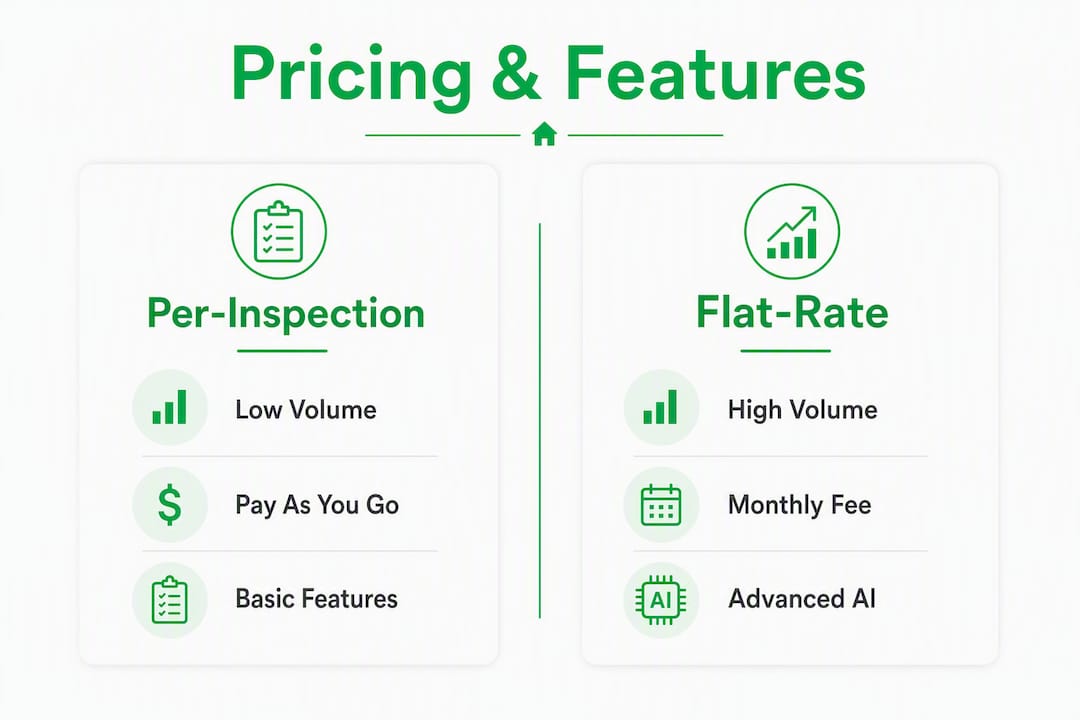
When a flat subscription wins: You do a substantial volume of inspections per month consistently. Per-inspection fees compound quickly and often exceed a flat monthly plan within a few months of growth.
Pro Tip: Run a three-year cost projection, not just a monthly one. Hidden per-inspection surcharges and AI feature add-on fees can flip the math entirely by year two.
What do the top alternative platforms actually offer?
AI-first flat-rate platforms
These platforms lead with automation. Photo defect detection flags issues directly from field photos, voice dictation converts spoken findings into formatted report text, and AI automates reporting workflows so inspectors spend more time on the property and less time at a desk. Template libraries are large, and one-click import tools move your existing reporting structure over without manual rebuilding. Onboarding typically runs a few hours to one day. Pricing is a flat monthly subscription, which means your cost stays fixed whether you do 15 or 40 inspections that month.

Ask on a demo: Can I import my current templates in one session? Show me a sample exported PDF. What happens to my data if I cancel?
Spectora
Spectora is built specifically for home inspectors and has become one of the most widely adopted platforms in the U.S. market. It covers scheduling, reporting, client delivery, agent communication, and payment collection in a single interface. The mobile app handles offline capture well. Report templates are highly customizable, and the client-facing summary is clean enough that agents actually read it. Pricing is a flat monthly subscription with tiers based on team size. Onboarding runs one to three days for a solo inspector who imports existing templates. A free trial is available.
Inspection Support Network (ISN)
ISN sits closer to the CRM and business-management end of the spectrum than pure reporting. It handles scheduling, automated client communications, agent follow-ups, and accounting integrations. Reporting is done through a connected tool rather than natively, which means you may run ISN alongside a separate report writer. That two-tool setup adds complexity but gives multi-inspector firms granular control over each function. Pricing is subscription-based. Demo availability is standard.
HomeGauge
HomeGauge has been around long enough that many inspectors already have templates built in it. The report editor is deep — you can customize every section, condition, and comment library. The Create Request List feature (a HomeGauge trademark, distinct from Jhunthomeinspections’s own Create Request List™) lets buyers and agents flag repair items directly from the report. Offline mobile capture works, though the app is less polished than newer competitors. Pricing is flat monthly. Template import from other platforms requires some manual work.
Palm-Tech
Palm-Tech appeals to inspectors who want to own their software outright. A one-time license option exists alongside subscription plans, which is rare in this market. The template editor is thorough, and the platform has a long track record with ASHI and InterNACHI members. AI features are limited compared to newer platforms. Onboarding takes longer — expect two to five days to get templates configured. A trial version is available.
Home Inspector Pro
Home Inspector Pro focuses on client-facing report delivery and agent communication. The client portal is polished, and the platform supports e-signatures and direct agent access to reports. Template customization is strong. Mobile offline mode works reliably. AI features are limited. Pricing is flat monthly. Migration support includes assisted template import. Trial available.
zInspector
zInspector targets property managers and inspectors doing move-in/move-out or rental walkthroughs as much as traditional home inspections. It handles photo-heavy, checklist-style reports quickly. The mobile app is fast and offline-capable. Report customization is moderate — sufficient for straightforward inspections, less flexible for complex residential reports. Pricing can be per-inspection or low flat rate depending on the plan. AI features are minimal.
Jobber
Jobber is not an inspection-reporting tool. It is a field service management platform that handles scheduling, dispatch, quoting, invoicing, and payment collection. If your reporting workflow is already handled elsewhere and you need the business-operations layer, Jobber fills that gap cleanly. QuickBooks integration is strong. It will not replace a report writer. Free trial available.
AppFolio
AppFolio is an enterprise property management platform. Inspection functionality exists within a broader suite that covers leasing, maintenance, accounting, and tenant communication. It fits firms managing rental portfolios alongside inspection services. The entry cost is higher than standalone inspection tools, and a demo is typically required before pricing is disclosed. Template customization for inspection reports is moderate.
Choosing between these platforms comes down to one practical question: do you need a report writer, a business operations tool, or both? Most inspectors switching from sageinspect.com need the report writer first. Layer in scheduling and CRM only after the reporting workflow is solid.
Pro Tip: During any trial, run one complete inspection end-to-end: import a template, capture photos offline, dictate findings, generate the PDF, and deliver it to a test client email. If any step breaks, you have found the platform’s real limitation.
How do you pick the right inspection software for your business?
Start with this question: Do you scale by doing more inspections yourself, or by adding inspectors to your team? Solo inspectors scaling by volume need flat-rate pricing and fast reporting. Multi-inspector firms need team management, scheduling, and CRM on top of reporting.
Decision checklist:
- Template import: Does the vendor offer assisted or one-click import? Manual rebuilding of a large template library can cost 10–20 hours.
- Offline mobile app: Test it in airplane mode. Offline capture is non-negotiable for inspectors working in low-connectivity areas.
- AI features: Are voice-to-text and photo defect detection included in the base plan, or metered as add-ons?
- Integrations: Does it connect to your scheduling tool, payment processor, and accounting software (QuickBooks, Stripe)?
- Data export: Can you export all reports, photos, and client data in a standard format if you leave?
- Support SLA: Is live support available during business hours, or is it email-only with 48-hour response windows?
Questions to ask on a demo:
- Walk me through importing my existing templates. How long does it take?
- Show me a sample exported PDF from a completed inspection.
- Who owns my photos and report data? Can I export everything if I cancel?
- What does your API or integration look like for [your scheduling or accounting tool]?
- Are there per-inspection fees on top of the monthly subscription?
Red flags to watch for:
- Per-inspection fees buried in the fine print on top of a monthly subscription
- No template import tool — manual rebuilding only
- Photo tagging that requires manual entry rather than auto-capture from the field
- Support that is email-only with no live chat or phone option
- No data export capability or export locked behind a cancellation fee
How do you switch platforms without losing revenue or clients?
Migration feels riskier than it is, but only if you skip the pilot step. Running one or two live inspections on the new platform before cutting over fully protects both your revenue and your client experience.
Migration checklist:
- Export all templates, report PDFs, and client data from your current platform before you do anything else.
- Import one template into the new platform and verify every section maps correctly.
- Run one complete live inspection: offline photo capture, voice dictation, report generation, PDF export, e-signature delivery.
- Validate the client-facing report formatting against your current standard.
- Confirm your e-sign and payment delivery workflow functions end-to-end.
- Schedule a walkthrough of the new report format with one trusted agent or buyer contact before going live broadly.
Keep both platforms active for two to four weeks during the pilot. Export and archive your legacy PDF reports before the old account closes — those are your historical record.
The per-inspection vs. subscription cost trap:
A solo inspector doing a moderate to high number of inspections per month on a per-inspection fee model can exceed the cost of a flat monthly subscription within a few months. Switching to a flat-rate model at sufficient volume can save a significant amount annually once per-inspection surcharges and AI feature fees are factored in. The math gets worse if AI features are metered separately on a per-inspection basis.
| Scenario | Per-inspection model | Flat monthly subscription |
|---|---|---|
| 10 inspections/month | Lower total cost | Subscription may cost more |
| 20 inspections/month | Costs approach or exceed flat rate | Flat rate typically wins |
| 30+ inspections/month | Significantly higher cost | Clear savings |
Pro Tip: Keep your legacy platform active for at least two weeks after going live on the new one. Do not cancel until you have confirmed that every historical report is exported and accessible.
Per-product profiles: what each platform does best
Spectora is the go-to for inspectors who want a modern, all-in-one tool. Scheduling, reporting, client delivery, and payments are tightly integrated. The mobile app is reliable offline. Pricing is a flat monthly subscription. Free trial available. Onboarding for a solo inspector: one to three days.
ISN handles the business side — scheduling automation, agent follow-up sequences, and accounting integrations — better than almost any other tool in this category. It pairs with a separate report writer rather than replacing one. Subscription pricing. Demo required for full pricing details.
HomeGauge suits inspectors who need deep template control and a proven Create Request List workflow for agent communication. Flat monthly pricing. Template migration requires some manual effort. Trial available. Onboarding: two to four days.
Palm-Tech is the choice for inspectors who want a one-time license option and full local data ownership. AI features are limited. Onboarding takes longer than cloud-native tools. Trial version available.
Home Inspector Pro delivers a polished client portal and strong e-signature workflow. Template customization is solid. Flat monthly pricing. Assisted template import available. Trial available.
zInspector moves fast for high-volume, photo-heavy walkthroughs. Less suited to complex residential reports. Per-inspection or low flat-rate pricing. Minimal AI features. Free tier available.
Jobber handles scheduling, dispatch, and invoicing for field service businesses. Not a report writer. Strong QuickBooks integration. Flat monthly subscription. Free trial available.
AppFolio fits firms managing both inspections and rental portfolios. Higher entry cost. Moderate report customization. Demo required. Onboarding: one to two weeks.
How does customer support compare across these platforms?
Support quality varies more than pricing pages suggest. Spectora and Home Inspector Pro are consistently cited for responsive live chat and onboarding assistance. ISN offers dedicated onboarding support, which matters for multi-inspector firms configuring complex scheduling automations. HomeGauge and Palm-Tech have long-established user communities and knowledge bases, which compensates somewhat for slower direct support response times.
Jobber offers live chat and phone support during business hours, which is above average for a field service platform at its price point. AppFolio support is enterprise-tier — structured onboarding, dedicated account management at higher plan levels, but slower for ad hoc questions.
The platforms to scrutinize most carefully on support are per-inspection marketplace tools and lightweight field apps. Email-only support with 48-hour response windows is common in that tier, and it becomes a real problem when a client is waiting on a report.
Ask every vendor the same question on a demo: “If I have a formatting issue with a delivered report at 7 PM on a Friday, what is my resolution path?” The answer tells you more than any SLA document.
What do verified user reviews say about these alternatives?
Review platforms like GetApp surface consistent patterns across the top inspection software alternatives. Spectora earns strong marks for ease of use and report speed. HomeGauge users praise template depth but note a steeper learning curve. ISN reviews highlight scheduling automation as a standout feature, with some users noting the two-tool setup (ISN plus a separate report writer) adds complexity. Home Inspector Pro reviews frequently mention the client portal as a differentiator.
zInspector reviews reflect its property-management roots — high marks for speed and photo handling, mixed feedback on report depth for traditional home inspections. Jobber reviews are consistently positive on scheduling and invoicing but confirm it is not a report-writing tool.
Palm-Tech has a loyal user base, particularly among ASHI and InterNACHI members who have used it for years. Newer inspectors sometimes find the interface dated compared to cloud-native competitors. AppFolio reviews are strong for property management firms but note that inspection-specific features are secondary to the broader platform.
The most reliable signal across all review sites: look for corroborated comments about support responsiveness and what happened when something went wrong during a migration or a live inspection. Those edge-case reviews reveal more than the five-star summaries.
Key Takeaways
The strongest sageinspect.com alternatives combine flat-rate pricing, one-click template import, and AI-powered reporting to save inspectors 2–3 hours per inspection while keeping costs predictable at scale.
| Point | Details |
|---|---|
| Flat-rate wins at volume | Inspectors doing higher volumes of inspections per month typically save a significant amount switching from per-inspection fees to a flat subscription. |
| Template import is decisive | Platforms with assisted or one-click template import cut migration time from days to hours — ask for a live demo of this feature first. |
| Test offline before committing | Run the mobile app in airplane mode during your trial; offline capture is a must-have for field inspections in low-connectivity areas. |
| Support quality varies widely | Ask every vendor what happens at 7 PM on a Friday with a client waiting — the answer reveals more than any SLA document. |
| Jhunthomeinspections for St. Louis inspections | For property inspections in the St. Louis Metro area and Southern Illinois, Jhunthomeinspections delivers reports within 24 hours with no software migration required. |
What most inspectors get wrong when switching platforms
The conventional wisdom says pick the platform with the best reviews and migrate everything at once. That is the wrong order of operations.
The decision that actually determines whether a switch succeeds is not which platform you choose — it is whether you test the migration path before you commit. A platform with a slightly weaker feature set but a clean template import and reliable offline app will outperform a feature-rich tool that requires three days of manual template rebuilding and drops photos when the connection is spotty.
The second thing inspectors underestimate is the per-inspection fee trap. It is easy to compare a $50/month subscription against a $5/inspection fee and assume the per-inspection model is cheaper. At 15 inspections a month, that math flips. At 25 inspections, the gap is significant. Run the three-year projection, not the monthly one, and include every add-on fee the vendor charges for AI features, e-signatures, and storage.
The AI features conversation is also more nuanced than vendor pages suggest. Voice-to-text and photo defect detection genuinely save 2–3 hours per inspection across practitioner reports. But those features are only valuable if they are included in the base plan. Metered AI add-ons can erode the cost advantage of a flat subscription faster than most inspectors realize.
Pick the platform that passes the pilot test: one complete inspection, end-to-end, in under two hours, with a PDF you would be proud to send to a client.
Jhunthomeinspections serves St. Louis inspectors who want results, not software headaches
If you are evaluating sageinspect.com alternatives because you want faster, more reliable inspection reports — not because you want to spend a week migrating templates and configuring integrations — there is a direct path. Jhunthomeinspections delivers comprehensive residential and commercial property inspections across the St. Louis Metro area and Southern Illinois, with reports returned within 24 hours. No software to configure, no per-inspection fees to track, and no migration risk.
The service covers buyer’s inspections, pre-listing inspections, radon testing, mold, sewer camera, termite, and environmental testing. The Create Request List™ tool streamlines communication between buyers and agents directly from the report. For investors and lenders, mortgage consultation and loan draw inspections are available. Payment at closing is an option for qualifying transactions.
If you are ready to book or want to discuss which inspection services fit your situation, Jhunthomeinspections is available to schedule in-person or video inspections across the St. Louis Metro area and Southern Illinois.
Where to learn more about inspection software and services
Evaluating alternatives takes time. These resources cut the research short:
- Online Home Inspection Tools List for Buyers in 2026 — A practical feature checklist for what to test during a software trial, including what to look for in report delivery and client communication tools.
- Inspection Scheduling Best Practices for Agents and Inspectors — Covers scheduling integrations and workflow best practices relevant to any platform evaluation.
- Top 6 inspectnj.com Alternatives Home Inspection Providers 2026 — Another alternatives roundup on the same site, useful for comparing evaluation methodology across different platforms.
- GetApp Home Inspector Alternatives — Verified user reviews and ratings for home inspection software alternatives, including free tier and trial availability.
- Home Inspection Cost Explained: Your 2026 Pricing Guide — Useful for modeling per-inspection vs. subscription cost dynamics at your current volume.
Pro Tip: Before reading any vendor’s pricing page, check the GetApp or Capterra review thread for that product and filter for reviews that mention “migration” or “switching.” Those reviews surface the real onboarding experience, not the sales pitch.
Recent Comments